How to Publish a Claude Artifact: Publish vs Share (2026)
Publishing a Claude artifact now saves it privately, and sharing has moved to a Share dialog. On Pro and Max, its "Anyone with the link" option opens the page without a Claude account: the dialog promises that, and a Hostsmith team test on October 22, 2026 confirmed it, even though Anthropic's help centre says every viewer needs one (it also says artifacts that call Claude or your apps can't use the option). Artifacts made in a chat before September 16, 2026 keep the old Publish button, which on Free, Pro and Max still hands you a public link straight away. For your own domain, a password, or a page without Claude's bar across the top, export the artifact as HTML and host it yourself.
Updated October 22, 2026: rewritten for the Share dialog that replaced Publish for new artifacts on September 16, 2026.
What does "publish artifact" mean in Claude?
Publishing a Claude artifact now saves it to the Artifacts tab in your sidebar, visible only to you; only artifacts made in a chat before September 16, 2026 still get a public link from Publish.
New artifacts: the artifact stays set to Only you until you change that in the Share dialog. When the Hostsmith team asked Claude to publish an HTML file as an artifact on October 22, 2026, the chat card read "Artifact · Only you", and Claude said it had published the page "as a private artifact".
Legacy artifacts: on Free, Pro and Max, Publish creates a claude.ai/public/artifacts/<id> link, and Anthropic's help centre says "anyone with the link can view and use it without a Claude account."
On Free, Pro and Max, the button tells you which kind you've got: Publish on a legacy artifact, Share on a new one.
What is a Claude artifact?
A Claude artifact is, in Anthropic's words, "anything Claude makes for you that you'd put in front of someone": a document, deck, design, dashboard or small interactive tool, opened in its own window beside the chat. Claude makes one when the content is significant and self-contained, "typically over 15 lines" (help centre, October 2026).
As of October 2026, the kinds are:
- Docs, Slides and Design templates, on every plan, Free included.
- Dashboards (beta), on Pro, Max, Team and Enterprise.
- Motion (beta), which exports MP4, on Team and Enterprise.
- Custom artifacts, which Anthropic Academy describes as an interactive page built for your request, like a tracker or an intake form, that can save what people enter.
- Code and HTML: snippets, diagrams, flowcharts and single-page sites, including the sort of vibe-coded landing pages people now build in a chat.
If Claude won't make an artifact at all, check that "Cloud code execution and file creation" is on under Settings > Capabilities.
Publish vs Share: what changed on September 16, 2026
For everything made from that day on, sharing moved from a Publish button to a Share dialog. Anything made in a chat before it is a legacy artifact, and Anthropic's help centre (October 2026) says legacy artifacts "keep working, and you can still publish and share them, but you can't make new ones."
Claude artifact sharing, legacy vs new: checked October 22, 2026
| Feature | Legacy artifacts | New artifacts |
|---|---|---|
| Button and flow | Publish, then copy the public link (Free, Pro, Max); "Share & copy link" on Team and Enterprise | Share, then choose who can open it under General access |
| Default visibility | Private until you publish | Only you |
| Who can open it | Anyone with the public link; your organisation for "Share & copy link" | You; people you invite by email (beta); your organisation (Team, Enterprise); or anyone with the link |
| Claude account needed to view | Not for a public link, except for features that use Claude | Help centre: yes. Share dialog and Hostsmith team test: no, for "Anyone with the link" (Max plan, static HTML, Oct 22) |
| Link format | claude.ai/public/artifacts/<id> | claude.ai/artifact/<id> |
| Plans | Publish on Free, Pro and Max; "Share & copy link" on Team and Enterprise | Link sharing and email invites on Pro, Max, Team and Enterprise (Team and Enterprise need External sharing on for links); none listed for Free |
| Storage (20 MB of text per artifact, Pro and up) | Works only after publishing | Works without publishing |
| Embed code | Get embed code, with a list of allowed domains | Not described by Anthropic |
| Unpublish or stop sharing | Unpublish is one-way and deletes stored data | Set General access back to Only you (Only people invited on Team and Enterprise). On Pro and Max, invitees keep access until you remove each one. |
Sources: Anthropic's help centre articles on what artifacts are and sharing artifacts, its article on Cowork artifacts, Anthropic Academy's custom artifacts tutorial, and a Hostsmith team test on October 22, 2026.
Cowork artifacts made before August 19, 2026 are live artifacts: they can't be edited in place and share only inside your organisation, with "no external or public links" (help centre). Anything made in Cowork since then works like any other artifact. Claude Code "can publish its session output as an artifact, a live interactive page at a private URL" too (help centre).
How to publish or share a Claude artifact
Share a new Claude artifact
- Make (or "publish") the artifact. Ask Claude for it in a chat, or start from a template in the Artifacts tab.
- Open it and click Share. Below an "Invite people by email" field and a "People with access" list, General access (the help centre calls it "Who has access") reads "Only you", with a Copy private link button.
- Switch General access to the link option. Claude asks you to confirm: "Share with anyone who has the link? Anyone with this link can view this artifact, even without a Claude account or sign-in."
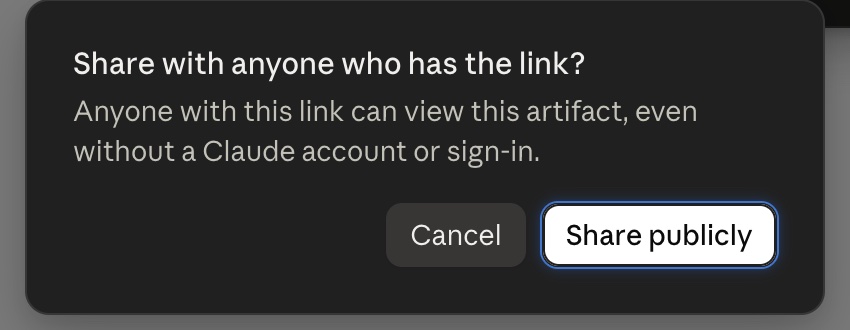
- Click Share publicly and copy the link. The
claude.ai/artifact/<id>address doesn't change between private and public (the Hostsmith team saw the same link in both states); only who it opens for does.
Invite by email (beta): on Pro, Max, Team and Enterprise, you can invite up to 50 people from outside your organisation per artifact, and each needs a Claude account under the invited address.
Organisation sharing: on Team and Enterprise, pick "Anyone at your organization's name"; the link option needs an Owner to turn on External sharing.
Sharing settings can't be changed in the iOS or Android apps.
Publish a legacy Claude artifact
- Open a legacy artifact.
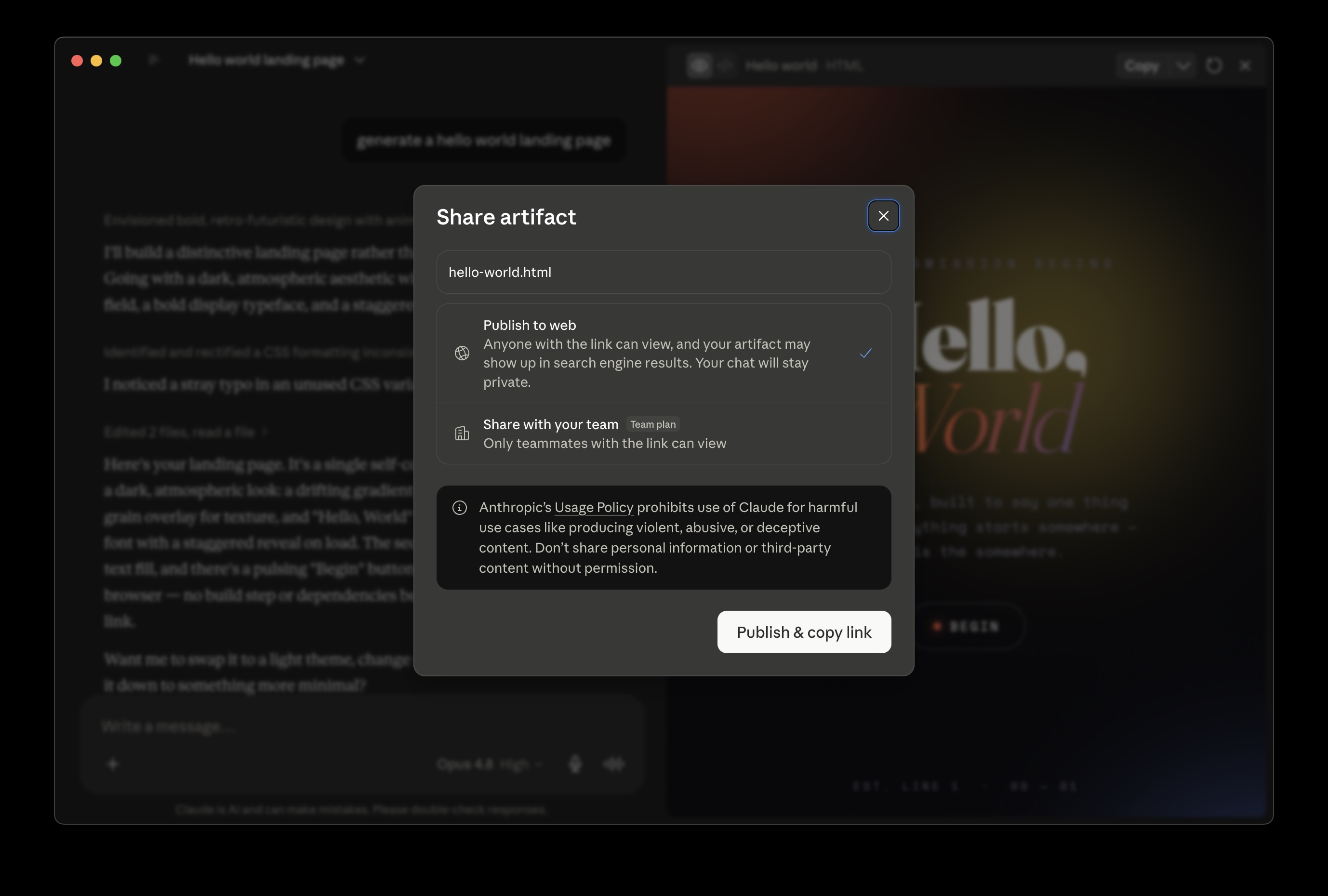
- Click Publish. The dialog offers "Publish to web", with the note "Anyone with the link can view, and your artifact may show up in search engine results. Your chat will stay private."
- Click Publish & copy link. You get a
claude.ai/public/artifacts/<id>address, and the artifact joins the Artifacts tab.
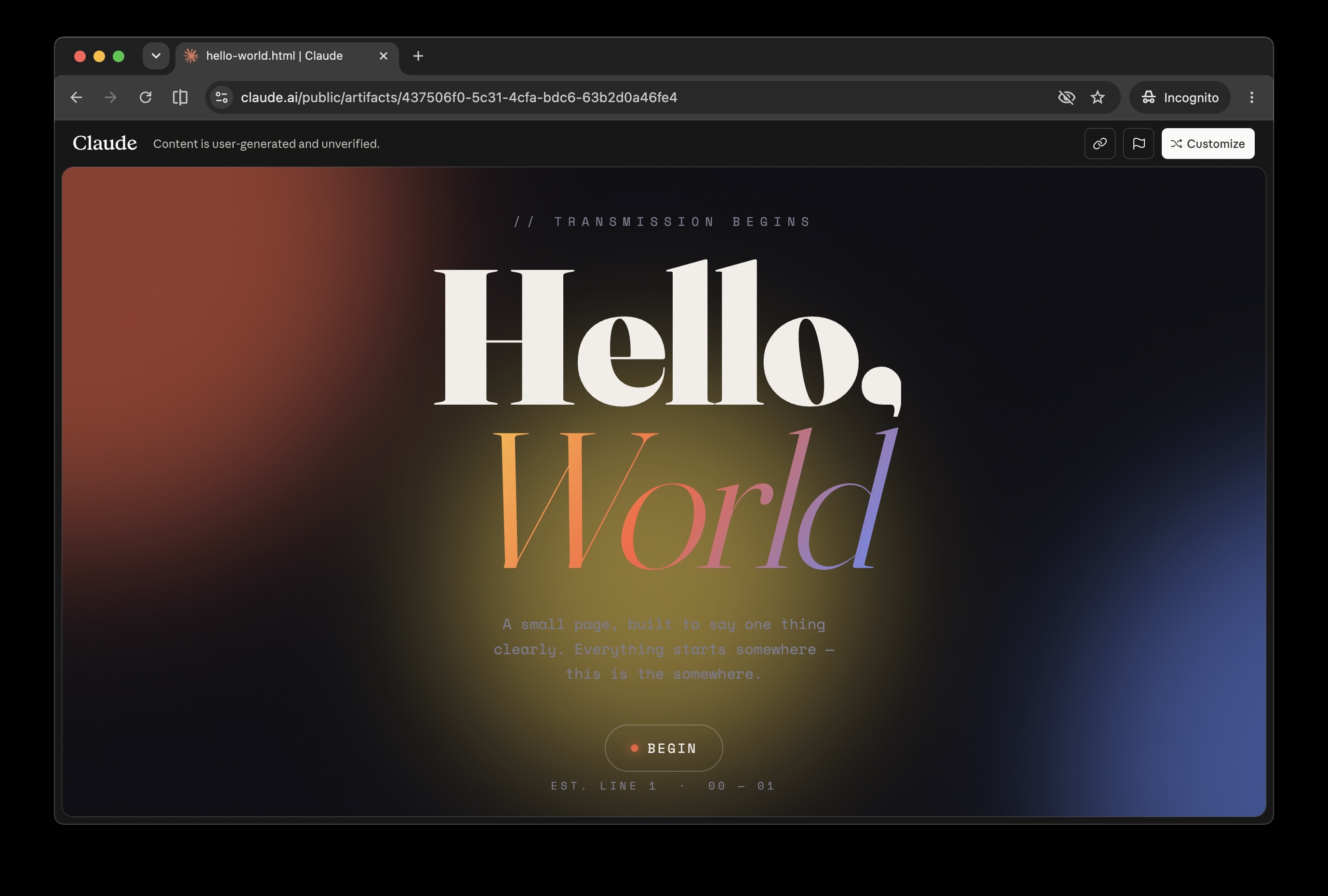
Anyone with that link can open it, signed in or not, and viewers are asked to sign up only for features that use Claude. Anthropic says people signed in on Free, Pro or Max can "copy and save it"; on the page, that's the Customize button in Claude's bar.
On Team and Enterprise, legacy artifacts get "Share & copy link" instead, which opens for people signed in to your organisation or, if an Owner has turned on External sharing, for anyone with the link, though they need a Claude account. Viewers "also get access to the attachments and files in that chat", so check your uploads first.
Does a shared Claude artifact update when you edit it?
For a new artifact, probably yes. Academy describes Claude changing an artifact in place, at the same claude.ai/artifact/<id> address the link already points to, though Anthropic doesn't say outright what link viewers see after an edit. For a legacy artifact, Codecademy's guide says "only the selected version is published", but Anthropic doesn't confirm it, so pick the version you want before you click Publish.
Saved entries survive "even after Claude changes it", says Academy, which suggests choosing Duplicate from the title menu first, "so you can compare the two or go back." If people already rely on the link, I'd duplicate before anything bigger than a typo. On either system, editing an earlier message branches the chat, each branch with "its own artifacts", so share the one you meant.
Can anyone access a Claude artifact?
Not by default. A new Claude artifact starts as Only you, and its private link shows signed-out visitors "Sign in to view this page". Switch General access to "Anyone with the link" on a paid plan and, going by the Share dialog and the Hostsmith team's test, anyone with the link can open it, account or not.
If an artifact calls Claude or your apps, the help centre says it can't use "Anyone with the link" at all; Academy adds that those parts don't work for signed-out viewers. Invitees use their own plan and connections: "an artifact that pulls from connected apps uses the viewer's connections, not yours."
Public viewers see the artifact under a Claude bar: its title, "Content is user-generated and unverified.", and Share and Sign in buttons. Anthropic's advice to viewers: "Only open shared artifacts from people you trust."
Where Anthropic contradicts itself
Anthropic's sharing article (October 2026) says "Everyone needs a Claude account. People without one can't open a shared artifact, even with the link."
The Share dialog's confirmation, quoted in the steps above, says the opposite, and the Hostsmith team's test backs it: after they clicked Share publicly, the link opened in an incognito window with no sign-in. The test's scope was a Claude Max plan, a static HTML artifact, October 22, 2026; we didn't test Free (which has no link option), Team or Enterprise external links, or an artifact that calls Claude.
Anthropic Academy sides with the dialog too: with "Anyone with the link", "people outside your organization and people who aren't signed in to Claude can open it."
My read: for a static page on Pro or Max, believe the dialog, which makes its promise at the moment you click. For anything that calls Claude or your apps, expect sign-in prompts, or no link option at all.
What Claude's sharing can't do
Claude's sharing is built for passing work around, not for running a website:
- No custom domain. Links stay on
claude.ai/artifact/<id>, orclaude.ai/public/artifacts/<id>for legacy artifacts. - Claude's bar on every public view, Sign in button included: fine for a colleague, a bit odd on a client's pricing tool.
- No password for outsiders. The choices are you, named people with Claude accounts, your organisation, or everyone with the link.
- No visitor numbers. Anthropic's sharing pages describe no view counts or analytics.
- Search engines. Beyond the legacy dialog's warning, Pluto Security's August 2026 research found legacy public pages from Free accounts indexed by Google, while paid-plan Claude Code shares carried
x-robots-tag: none. The new dialog says nothing either way, so treat any public link as findable. - Blocked networks. Some networks block claude.ai, and the link does nothing for anyone stuck behind one.
- The runtime isn't yours. On April 1, 2026, a user reported on GitHub that every user-published artifact on claude.ai showed a blank screen, which the reporter traced to a postMessage origin mismatch between claude.ai and claudeusercontent.com. They closed the report on April 2 when pages loaded again; Anthropic never commented.
Common Claude artifact gotchas before you share
A few things behave differently inside Claude than on the open web:
- Curly quotes in HTML attributes. If a page renders blank or half-styled, look for smart quotes inside
attr="...", and try asking Claude to "use only straight ASCII quotes in HTML attributes". - No calls to your own API. Pluto Security also reported, before the Share change, that the artifact sandbox's content security policy sets
connect-src 'self', which blocksfetch()to outside servers, so anything that needs a backend has to be stubbed while it lives in Claude. - Saving state. Don't count on
localStorageinside Claude; Anthropic's supported route is artifact storage, on Pro and up. - Shared storage. Some artifacts save information "that everyone who opens them can see" (help centre), so check yours before a client types anything sensitive.
- The bundler trap. React artifacts can come back with bare
importlines and no CDN script tags; they run in Claude's preview and fail everywhere else. The single-file prompt below fixes that.
How do I download or export a Claude artifact?
For a new artifact, choose Export in the artifact's title menu and pick HTML (Anthropic Academy); the Share dialog's Export tab does the same job. Export > HTML is the closest thing to a Claude artifact downloader. Template-based artifacts get more formats (help centre, October 2026):
- Docs: Word, PDF, Markdown or Google Docs.
- Slides: PowerPoint or PDF, or straight to Google Slides.
- Design: a .zip, PDF, PowerPoint or standalone HTML.
- Motion: MP4 video.
Know what you lose. Per Academy, "in the exported copy, the parts that save entries, use Claude, or use connected tools stop working." A calculator survives; a team tracker becomes a nicely styled form with no memory. If remembering per browser is enough, ask Claude for an export copy that uses localStorage instead of artifact storage.
For a legacy artifact, the controls at the top of the artifact panel let you view the code, copy it or download it.
If you don't get one tidy file (React artifacts are the usual suspects), ask Claude for one, and say everything goes inline so it doesn't assume a bundler:
Give me the complete artifact as a self-contained single-file HTML file. Inline all the CSS and JavaScript, replace any imports with CDN script tags (React, Tailwind, etc.), and make sure it runs by just opening the file in a browser - no build step.
Double-click the saved file; if it works from your desktop, it'll work on a host.
Before the file goes anywhere, take out any API keys Claude wrote in for testing, and stub relative paths such as /api/something, which won't exist on the new host.
John Whitaker's Deploy Your Artifacts note has a habit worth borrowing: one tools/ folder on your host, a subfolder per artifact. For the wider picture, see the guide to hosting an HTML file online.
How to host a Claude artifact on your own URL
Hostsmith (ours, for the record) puts the exported file at an address that belongs to you rather than to Claude: a your-tool.us.hostsmith.link address on any plan, or your own domain from Pro, with no Claude header bar or sign-in button on the page (Hostsmith's own branding comes off from Starter). There are two ways to get it there.
From the chat, with the Hostsmith connector. In Claude, open Customize > Connectors, choose + Add > Add custom connector, paste https://mcp.hostsmith.net/mcp and sign in to Hostsmith. Free Claude plans allow one custom connector, and since Free can't link-share new artifacts, it's a way to get one onto a public URL without leaving the chat. Then ask: "Publish this artifact on Hostsmith as my-budget-tool." Claude sends the file and hands back the live URL, and "redeploy my-budget-tool with this version" updates it at the same address; the Hostsmith team ran both through the connector on October 22, 2026. Claude Code and other MCP clients connect too.
By hand. Export the artifact as one HTML file and drag it into the Hostsmith dashboard; a single HTML file becomes the site's home page. When it changes, drop the new file onto the same site in the dashboard and it takes the old one's place.
Free covers 1 site, 5 MB of storage and 5 GB of bandwidth each month, enough for a single-file tool. Starter, at $5 a month billed annually ($9 month by month), adds Private Sites: a password, or an allowlist of email addresses, and visitors get in without a Claude account. Pro, at $15 a month billed annually ($21 month by month), runs up to 5 sites, each able to take a custom domain, so a client's calculator can live at tools.theirbrand.com (pricing checked October 2026).
Other ways to host a Claude artifact
Most static hosts will take the exported file, though some want it inside a folder or ZIP. Here's how the common ones compare.
Ways to host an exported Claude artifact, checked October 22, 2026
| Method | Account to deploy | Custom domain | Password protection | Update at the same URL? | Best for |
|---|---|---|---|---|---|
| Hostsmith (ours) | Yes (free) | Pro and up | Password or email whitelist, Starter and up (Private Sites) | Yes: re-upload in the dashboard, or redeploy through the connector | Your own URL, or publishing straight from Claude through the connector |
| Netlify Drop | No account to drop; the link sits behind a temporary password until you claim it | Yes, on Free, once claimed | Pro, $20 a month | Yes: drag a new folder onto the project's production deploys | A public link for one file, no sign-up to start; claim it, then make it public |
| Vercel Drop (vercel.com/drop) | Yes | Yes; the Hobby plan is for non-commercial use only | Pro, plus $20 a month per protected project | No: each drop makes a new project (Git or the CLI can update it) | A one-off demo if you already have a Vercel account |
| Cloudflare Pages | Yes; drag and drop in the dashboard | Yes, on Free | No shared password; Cloudflare Access email login, free up to 50 users | Yes: Create a new deployment, and pick Production | A free custom domain for a file you'll keep updating |
| GitHub Pages | Yes; a public repo on GitHub Free | Yes, on Free | None | Yes: commit to the repo | A file you don't mind sitting in a public repo, saved as index.html |
| CodePen / Gist | Yes, to save | No | No | Yes: edit the pen or gist | Showing someone the code rather than handing them a tool |
Sources: each provider's pricing and docs pages (Netlify, Vercel, Cloudflare, GitHub, CodePen).
Netlify Drop is the nearest thing to the old Publish button: drop a folder or ZIP with the file in it, no sign-up, but claim the site straight away or visitors hit a password prompt, and after claiming, check that Project visibility is set to public; Netlify's Free plan keeps new projects private by default. There's a full rundown of Netlify Drop and its alternatives, and a longer list of GitHub Pages alternatives.
For React artifacts too tangled to inline, the open-source claude-artifact-runner turns a .tsx or .jsx artifact into a Vite React app and builds static output, including one self-contained HTML file; it needs Node.js 20 or later and provides no backend.
How to embed a Claude artifact
Legacy artifacts: after you publish, click Get embed code for a snippet you can paste into another website, and list the sites allowed to embed it in the Allowed domains field, separated by commas.
New artifacts: neither the help centre nor Academy describes an embed option as of October 2026, and the Share dialog we tested had only Share and Export tabs.
Self-hosted: host the exported HTML yourself and drop a plain iframe wherever you want it:
<iframe
  src="https://my-tool.us.hostsmith.link/"
  width="100%"
  height="600"
  style="border: 0;"
  loading="lazy">
</iframe>
No Claude bar and no sign-in prompts.
FAQ
Can I publish a Claude artifact privately? Yes: a new artifact is private (Only you) as soon as it's published, and paid plans can invite people by email, though the help centre says each of them needs a Claude account. If you'd rather gate it with a password, host the exported HTML behind one: Hostsmith Private Sites from Starter (a password or an email whitelist), or Cloudflare Access (free up to 50 people; visitors sign in with a code sent to their inbox). There's more on how to password-protect a static site.
Can I use a custom domain for a Claude artifact? Not on Claude's own links, which stay on claude.ai. For your own domain, export the artifact as HTML and put it on a host that supports custom domains; Netlify, Cloudflare Pages and GitHub Pages include them on their free plans (October 2026).
How do I convert a Claude artifact to PDF? Docs, Slides and Design artifacts export to PDF directly from Export. For an HTML or code artifact, export or download the HTML, open it in your browser and use Print, then Save as PDF. If the point is to send it to someone, you can then share the PDF as a link.
Are Claude artifacts free? Making them is: artifacts, including the Docs, Slides and Design templates, are on every plan, Free included. Sharing is where plans split, as Anthropic's sharing table lists link sharing and email invites for new artifacts on Pro, Max, Team and Enterprise, not Free, though Free can still publish legacy artifacts. Storage and connecting your apps need Pro or above, and when an artifact calls Claude, each person's usage counts against their own plan, not yours (help centre, October 2026).
How do I unpublish or stop sharing a Claude artifact? For a new artifact, set General access back to Only you (Only people invited on Team and Enterprise). On Pro and Max, invitees keep access until you remove each one. Legacy artifacts have Unpublish instead: the public link stops working, you can't publish that artifact again, and Anthropic permanently deletes its personal and shared storage data. Copies you exported or hosted elsewhere are unaffected.
Can I edit an artifact after I've self-hosted it? Get the updated HTML and either ask Claude to redeploy it through the Hostsmith connector, or upload it to the same site from the dashboard. The URL doesn't change.
When I was writing Perl for a Bristol agency, "publish" meant public; in Claude it now means save, and Share is where the public part went. Read the confirmation when you switch General access to the link option, and open the link in a private window before it reaches anyone who matters. If it needs a domain, a password or no Claude bar, export the HTML and put it somewhere you own.